
Open a project and choose Production > Forecast.
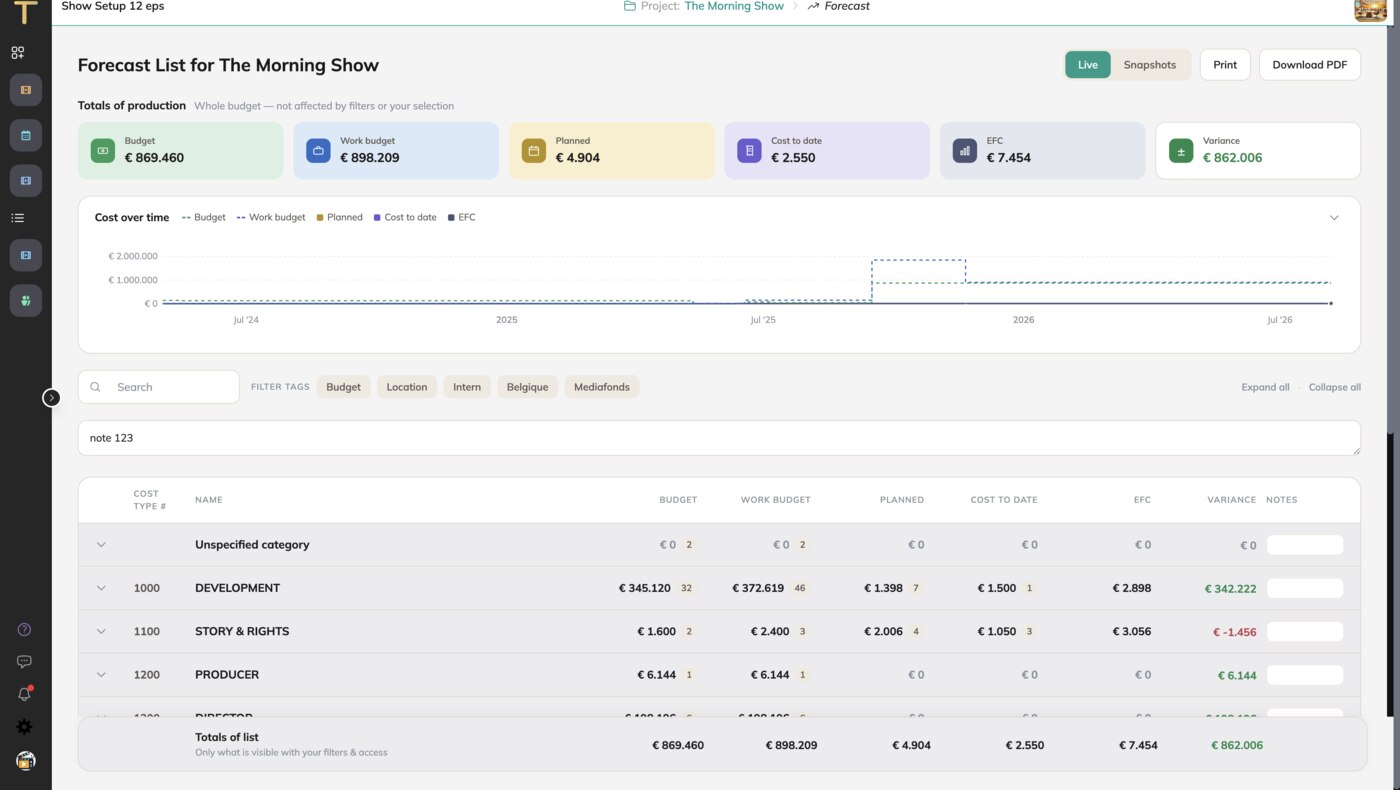
Lenses
The forecast has several lenses, each a different cut of the same numbers:
- Default: budget, cost to date, committed, ETC, EFC and variance per cost category and cost type.
- Producer: the summary a producer needs, by category.
- Line Producer: the detail per cost type with the open commitments.
- Finance: the financial view with unlinked transactions and export status.
- Tags: the forecast by budget line tag, for cross-cutting views such as "per episode" or "per unit".
Cards
At the top: Cost to date, Committed costs & PO's and EFC, with the variance against the budget. Cards can be pinned, collapsed and reordered on the dashboards.
Cost type detail
Open a cost type to see everything behind its numbers: the work budget lines, the linked transactions (cost to date), the committed costs and the unlinked transactions. Here you add committed costs and, in the work budget, create, change, duplicate or delete lines.
Options
Account options change the columns: Show Expected column (the expected costs from the planning), Show unlinked transactions and Show budget minus unlinked.
Snapshots and printing
Create Snapshot freezes the forecast for later comparison. See Snapshots: track cost over time. Print produces the forecast as a document; there are separate prints for the comparison and the tag view.
AI analysis
Switch on the AI analysis to compare these categories with comparable finished productions in your account. The result is a commentary, not a number: use it to ask questions, not to change the forecast.